

Bell Schedules
Version 1.1 by Christine Sklareski on 2026/08/05 11:30
Securly Classroom - Using Bell Schedules - Teachers
Bell schedules automate how and when class sessions begin. Teachers can opt to use them or continue to create their own schedules. Follow the instructions below to enable classes using bell schedules.
In your Securly Classroom class settings, scroll down to Autostart:
- Enable Autostart.
- Click the “Use bell schedule” radio bubble.
- Select the correct block in the drop-down menu.
- Click Save in the top right corner.
Each day, Securly Classroom will run on a regular schedule. Your classes will begin and end automatically according to the period in the bell schedule that you’ve chosen.
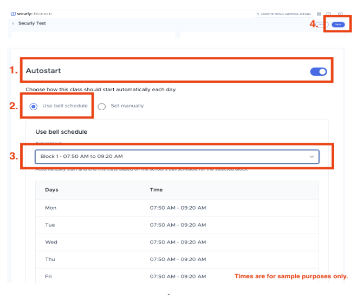
Securly Classroom - use Class Settings to enable bell schedules.
When the building schedule changes, teachers will have to:
- Change the autostart to “Set Manually” and adjust the times in their class settings, OR
- Manually begin the class at its start time and end it when the class is over.
- Teachers will need to remember to select the bell schedule again to resume using the automatic bell schedule.