

Student Absence Excuse Form Instructions
Last modified by Christine Sklareski on 2025/11/24 15:23
High School Absence Forms
Parents and guardians of students in the High School can now submit absence excuse cards through an online form in the Community Portal.
- Absence excuse forms can be submitted electronically up to 10 days after an absence.
- A paper excuse form will need to be submitted beyond the 10 day window.
- One absence per day can be submitted on each electronic form. Multiple forms must be submitted for an absence that spans more than one day.
Finding the Absence Excuse Forms in the Community Portal
- Log in to your Community Portal account.
- Select the student whose absence for which you'd like to submit an excuse form.
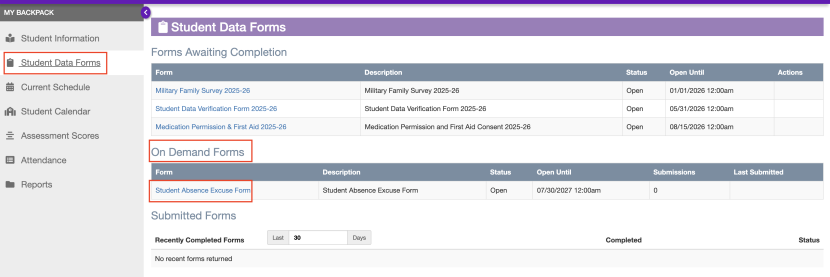
- Click on "Student Data Forms"
- Look for the "On Demand Forms" and click on "Student Absence Excuse Form"
Completing the Form
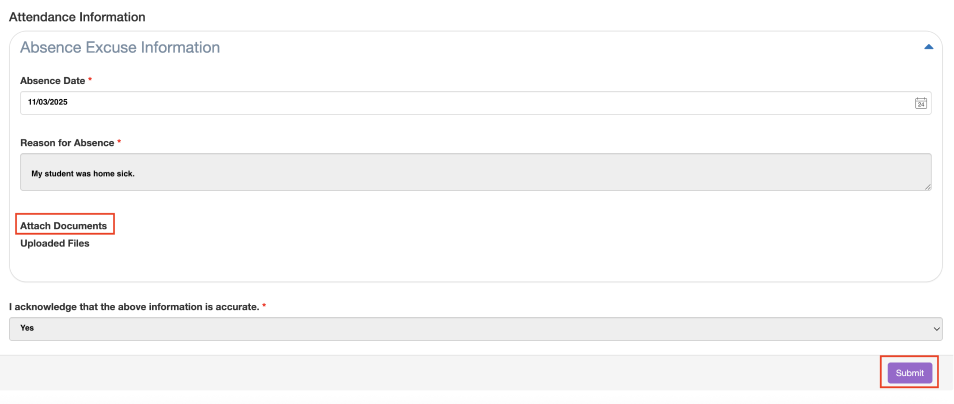
- All fields with a red asterisk are required and must be completed.
- The date field defaults to the current date and will need to be changed to the date of the absence. Manually enter the the absence date or select it in the calendar.
- Enter the reason for the absence.
- Upload all supporting documents. Be sure that the attachment appears under "Uploaded Files".
- Acknowledge that the information entered is correct - select Yes from the drop-down menu.
- Click "Submit".
- Complete one form per date. For example, if a student was absent three days in a row, three forms need to be submitted, one for each date.
- All submitted absence forms will be logged as "Absence Excused". An EASD representative will review all submissions and make any adjustments to the absence status as needed.
- Reach out to the High School office with any questions.
For technology support, submit a support ticket in IncidentIQ at http://remote.etownschools.org.